


Use APKPure App
Get AfterFocus old version APK for Android

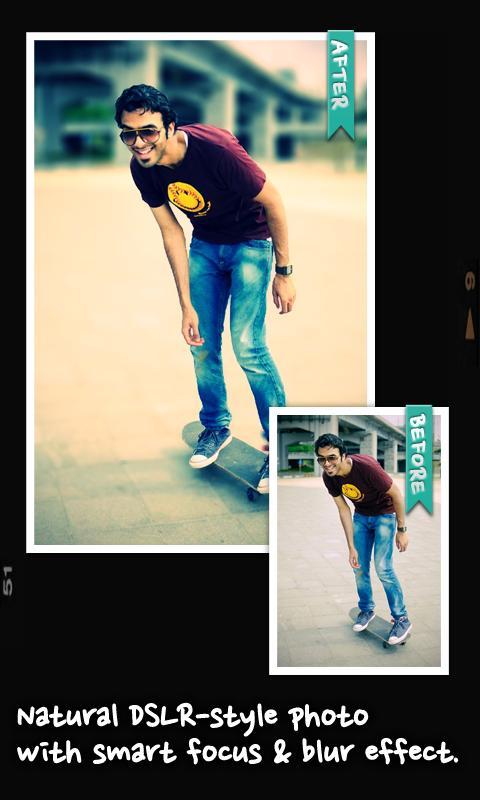
AfterFocus is a photo editing app that creates DSLR style background blur from simple focus selections.
AfterFocus helps when you want a portrait look without extra gear. It lets you highlight a subject and soften the surroundings for a natural depth effect. The workflow suits small screens and focuses on keeping edges clean as you edit. Plus, there are simple adjustments to match the scene before sharing. Some users explore AfterFocus APK for their needs, aiming for the same straightforward tools and consistent results.
Smart focus area selection
Draw a few guide lines inside the subject and background. AfterFocus detects the focus area automatically, even with complex shapes. Manual finger painting is available when you need precise edges. This helps you work faster on a phone.
Realistic background blur
Once the focus is set, choose from aperture styles to create blur that resembles DSLR results. Transitions between the subject and background stay natural, avoiding hard cutouts. You can also apply Motion blur to suggest movement where it makes sense.
Filters and bokeh tools
Beyond blur, you can apply filters from basic corrections to looks like Cross Process. The app avoids an artificial look by keeping effects balanced. Bokeh controls help you emphasize highlights in the background for a scene that feels consistent.
Quick sharing options
When the edit is finished, share photos by email or to social networks you use. The share flow is straightforward, so you can send results without extra steps.
AfterFocus focuses on depth control, natural blur, and practical filters that suit everyday portraits and scenes. It supports quick edits and simple sharing on a phone. For current tools and fixes, use the AfterFocus latest version and begin refining subjects and backgrounds with clear steps.
Last updated on Feb 6, 2020
* Adds AI cut which detects human object automatically in an image
* Fix crash when opening an image outside AfterFocus app
Latest Version
 2.2.3
2.2.3
Uploaded by
Rolando Stiven Pico
Requires Android
Android 5.1+
Category
Report





Discover what you want easier, faster and safer.
