


Use APKPure App
Get StreamChamp old version APK for Android
StreamChamp is a mobile live streaming app that broadcasts to Twitch, YouTube, Facebook, and RTMP destinations.
StreamChamp suits creators who need to go live from a phone during travel, events, or casual sessions away from a desk. It focuses on quick setup and clear controls so you can start a broadcast without extra gear. The app is built for iPhone and iPad, while an Android path is available through the StreamChamp APK. Because it targets mobile use, it brings key streaming tools into a single screen and keeps attention on clarity and stability.
Multi platform output
StreamChamp streams to Twitch, YouTube, Facebook, and custom RTMP endpoints directly from your phone or tablet. You can choose one destination or prepare multiple options based on your schedule. This helps reach different audiences without switching apps mid session.
Quality and stability controls
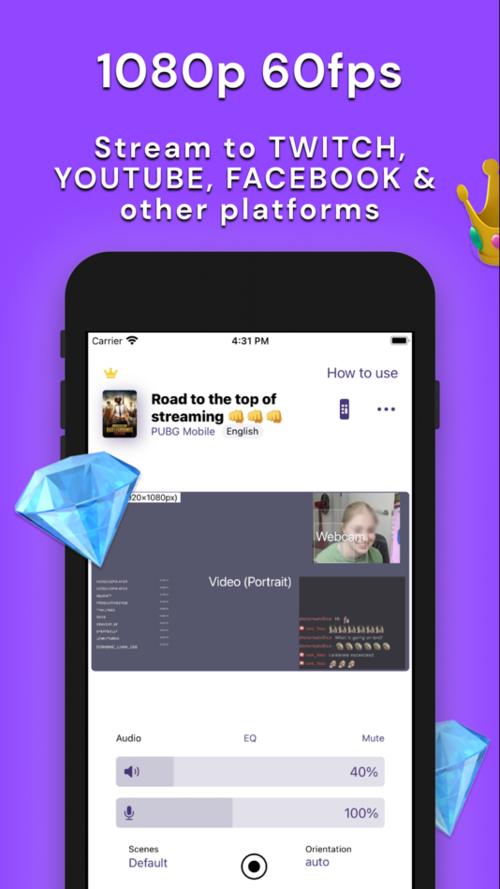
StreamChamp supports up to 1080p at 60 FPS. You can set orientation and adjust on screen position to fit portrait or landscape content. When the network slows down, fine tuning options help reduce stalls, and turbo mode is available with premium to stabilize streams on weaker connections.
Audio and device inputs
You can adjust microphone and app audio independently to balance voice and gameplay. StreamChamp works with AirPods and supports a web camera alongside remote control. This setup keeps voice, device audio, and a face camera aligned in one session.
Custom branding and overlays
StreamChamp lets you add overlays, logos, backgrounds, text, images, and video placeholders for a branded layout. The free tier includes a watermark. Premium removes the watermark and enables more flexible placeholder options for a cleaner look.
Live chat and alerts for Twitch
StreamChamp includes Twitch chat notifications and quick replies to help you respond without leaving the broadcast. You can add sound alerts and custom text to speech to highlight chat activity. Interruption notifications help you react quickly if a connection issue occurs.
The StreamChamp app is primarily designed for iPhone and iPad. StreamChamp for Android is available through an APK, and feature availability may differ from the iOS build. If you need specific tools for a show or event, test your setup in advance to confirm parity. Before starting a StreamChamp download, check your platform and destination needs to avoid last minute changes.
StreamChamp follows a freemium model. The free version includes core streaming, basic overlays, and a watermark. Premium removes the watermark and unlocks options such as custom video placeholders and turbo mode. These upgrades suit users who maintain frequent schedules or need a consistent brand layout for games like Wild Rift, PUBG Mobile, Brawl Stars, Roblox, or Minecraft, as well as mobile art sessions in apps like Procreate.
During setup, StreamChamp may request microphone and camera access, screen capture for gameplay or app demos, notifications for chat and status, and access to media files to load overlays and logos. When connecting Twitch or other platforms, it may ask to manage or edit broadcast settings, read your stream key, and view or send chat on your behalf. Review each prompt carefully and grant only what is necessary for your stream plan.
A known black screen issue can occur on some devices. If this happens, restart the app and re enter the broadcast setup. This quick reset often restores the preview and output.
For connection stability, try these simple steps. Use a stable Wi Fi network or a strong cellular signal. Close other heavy apps before going live to free up memory. Lower resolution or frame rate when bandwidth is limited, and enable turbo mode if you use premium. Run a brief private test to verify audio balance and chat tools before a public stream.
This quick guide covers the basic flow to set up a mobile stream. Follow the steps to connect services, add your branding, and start broadcasting. If you plan to download StreamChamp for Android, prepare your stream key or account logins beforehand for faster setup.
StreamChamp brings multi platform mobile broadcasting, branding controls, and Twitch chat tools into a focused workflow. Users who need dependable controls on a phone can set quality, audio, and layout in a few steps. For consistent setup and fixes, consider the StreamChamp latest version to access recent improvements.
Last updated on Jun 21, 2023
StreamChamp is a freemium multimedia tool that allows you to stream on any platform
Latest Version
 1.0
1.0
Uploaded by
Szymon Szymon
Requires Android
Android 5.0+
Category
Report





Discover what you want easier, faster and safer.
