


Use APKPure App
Get Document Scanner - PDF Creator old version APK for Android
Document Scanner - PDF Creator is a mobile scanning app that turns your phone into a document digitizer.
Document Scanner - PDF Creator suits users who need fast, tidy scans at home, school, or work. It helps capture receipts, forms, notes, and multi-page paperwork, then turns them into clear PDFs or images for storage and sharing. Whether you are organizing bills or saving a whiteboard after a meeting, the app focuses on quick capture and tidy output. When you use the Document Scanner - PDF Creator latest version, you also get an offline-friendly setup that keeps scanning reliably when connectivity is limited.
Automatic capture and clean pages
Document Scanner - PDF Creator detects edges and crops pages to reduce background and straighten skewed shots. Auto enhancement improves clarity so text looks readable after capture. If the room is dim, you can switch on the built-in flashlight and continue scanning. The app also works offline, so you can digitize documents even without a network connection.
Readability filters and noise cleanup
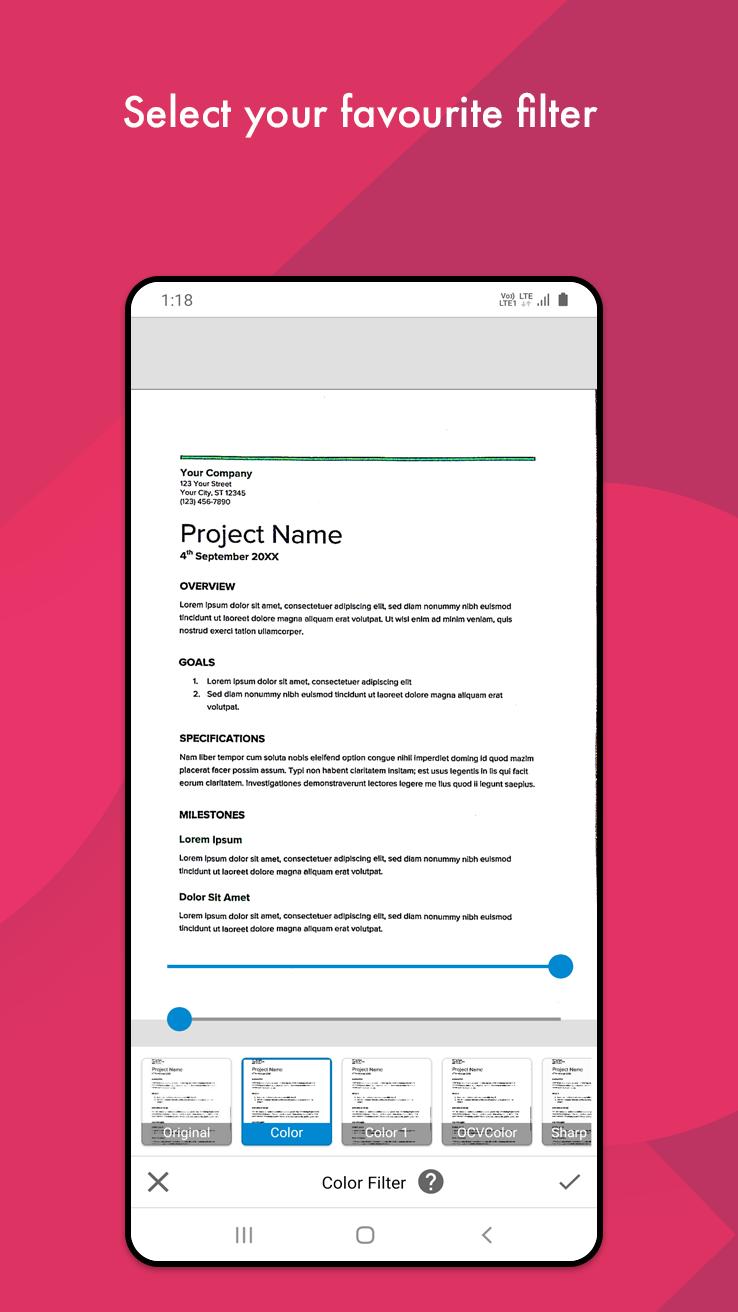
You can apply Black and White, color, lighten, or dark modes to fine-tune how text appears in the final file. These filters help bring out handwriting or faded print. Noise removal is available for older papers or classroom and meeting whiteboards, where shadows and marks can get in the way. As a result, you get pages that are easier to review and archive.
Multi-page PDFs and common sizes
The app supports creating multi-page PDFs when you need to scan a set of documents in one go. You can also export individual pages as JPEG images. During export, choose from common paper sizes such as A1 to A6, letter, and postcard to match your needs. This helps keep outputs consistent with office printers and standard file-sharing expectations.
Organize files and share quickly
You can place scans into folders and subfolders to keep projects separated. When a document is ready, share it by email or send it to cloud drives such as Google Drive and Dropbox for backup. This flow keeps everything accessible while you move between devices and collaborators. It also helps keep personal and work files in order without extra steps.
Print, fax, and code tools
Document Scanner - PDF Creator includes direct print and fax options so you do not have to switch apps to finish tasks. It also scans QR codes and barcodes for quick lookups. Additionally, you can create your own QR codes to share links, contact details, or simple inventory labels. These extras help bridge paper, digital files, and quick sharing in one place.
If you regularly process receipts and invoices, the app helps capture them quickly and store them by category. For contracts or forms, you can scan each page, combine them, and export a single PDF for records. Students and meeting attendees can save whiteboards and handouts before they are erased or misplaced. Users with older documents can use noise cleanup to make faded pages more legible.
Many users need scanning when there is no stable connection, such as during travel or in low signal areas. Document Scanner - PDF Creator works offline, so captured pages stay on the device until you decide to share or back them up. This approach also gives you control over when and how files are uploaded. If needed, cloud sharing remains available when you reconnect, so work does not stop.
This short guide covers a basic scan and export routine. If you are new, installing the Document Scanner - PDF Creator APK and setting permissions will help you get started quickly.
Open the app, then allow camera and storage permissions so pages can be captured and saved on your device.
Place your document on a flat, contrasting surface, then tap the scan button. If the lighting is low, turn on the flashlight and align the page within the frame.
Wait for edge detection, then confirm or adjust the crop so margins are correct. Apply a suitable filter to improve readability, and rotate or deskew if needed.
Add more pages if you are building a multi-page file, and drag to reorder them so the sequence matches the original set.
Select export to create a PDF or JPEG, choose a paper size, and name the file. Save it into a folder, then share, print, fax, or back it up to a cloud drive as required.
This app focuses on clear capture, practical editing, and tidy export for daily paperwork. To begin, download Document Scanner - PDF Creator APK latest version from APKPure, and turn scattered papers into organized digital files.
For official support and more details, use the links below.
Website: http://docscanner.in/
Email: [email protected]
Last updated on May 19, 2026
• ✨ New premium document filters
• ✂️ Smarter Split with advanced options
• 📌 Pin documents for quick access
• 🔍 Search Settings faster
• 🕒 Improved date & time settings
• 🖼️ New image watermark tool
• 📂 Set a default folder for new scans
• ⚡ Apply crop to all pages added.
• ⚡ Improved crop performance and fixed related issues.
• ⚡ Bug fixes and performance improvements
Latest Version
 6.9.9
6.9.9
Uploaded by
Sham Patil
Requires Android
Available on

Category
Report






Discover what you want easier, faster and safer.
