


Use APKPure App
Get Bugjaeger old version APK for Android
Bugjaeger is a mobile ADB and fastboot tool that lets you control and debug other Android devices directly from your phone.
Bugjaeger turns your Android phone into a portable toolkit for developers and advanced users. It connects to phones, tablets, Android TV, Wear OS watches, Raspberry Pi with Android Things, and Oculus headsets through USB OTG or Wi Fi. It communicates over authorized ADB, respects the Android security model, and helps you handle tasks that usually require a laptop. Get the Bugjaeger APK latest version to streamline on device testing, maintenance, and field support with a single handheld device.
Laptop free ADB and fastboot
Bugjaeger runs shell commands, scripts, reboots, and fastboot operations directly from your phone. It reads bootloader variables and executes device actions without a computer. This helps you work faster during on site checks and lab workflows.
App deployment and backups
Bugjaeger installs regular and split APKs, including packages for Oculus headsets. It can pull installed APKs and perform ADB backups or extracts. Therefore you can move builds, capture states, and restore content when testing or migrating.
Debug logs and device insights
Bugjaeger captures logcat with filtering and export options. It shows system properties and detailed hardware and software information. Moreover, you can quickly gather evidence for issue reports and share logs with teammates.
Screen mirroring and remote control
Bugjaeger mirrors the target screen with touch input for quick interactions. It also includes a simple TV remote for Android TV devices. In addition, this visual control helps you verify UI behavior without picking up the other device.
App and process control
Bugjaeger installs, uninstalls, launches, force stops, or disables apps. It monitors processes and can terminate tasks when needed. Also, the app view shows detailed package information to support troubleshooting and QA checks.
File transfer and flexible connectivity
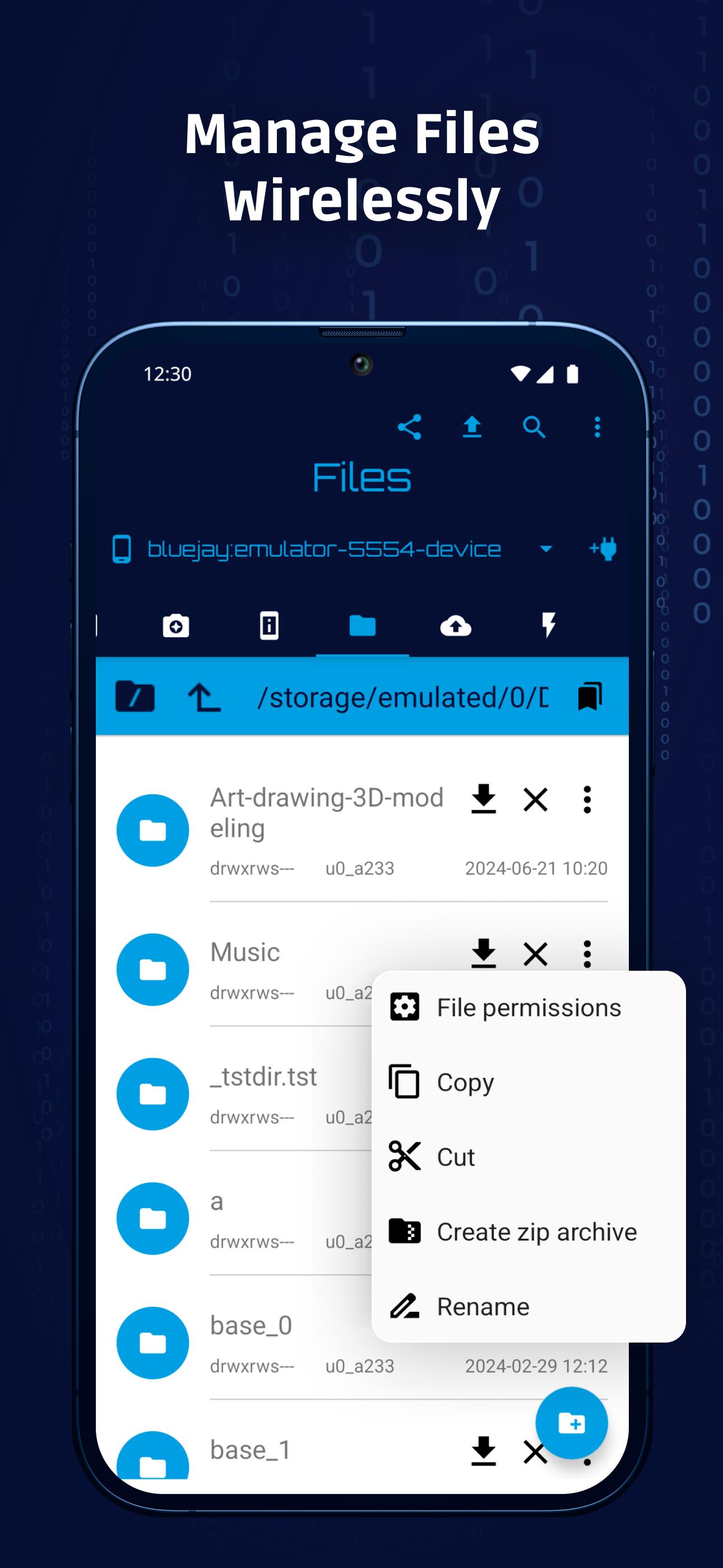
Bugjaeger pushes and pulls files and lets you browse the file system. You can connect over USB OTG for reliability or over Wi Fi to adbd on port 5555 for convenience. Finally, this flexibility fits both deskside and field setups.
Bugjaeger uses standard, authorized ADB communication and does not bypass Android security. You must approve pairing prompts on the target device, and some privileged actions require root or an unlocked bootloader. This keeps control in the user’s hands and aligns with platform safeguards.
Bugjaeger is practical for Oculus Quest sideloading, Android TV remote management, Wear OS testing, Raspberry Pi with Android Things, and Pixel or AOSP flashing tasks. It reduces laptop dependency and keeps common developer actions available on the go.
Bugjaeger is available in a free version that includes ads. Bugjaeger Premium offers an ad free experience and adds selected advanced features. Choose the edition that matches your workflow and budget, and download Bugjaeger in the format you prefer.
The developer indicates that the app may share app activity, app info and performance, and device identifiers. Data is encrypted in transit, and the shared data cannot be deleted within the app. Review these details before you install Bugjaeger APK on your primary device.
Follow these steps to connect to a target device and run your first action. This guide covers both USB OTG and Wi Fi, so you can pick the method that fits your setup.
Bugjaeger focuses on practical ADB and fastboot control from your phone. Get the Bugjaeger APK latest version for a clean, portable workflow and download Bugjaeger directly to start testing and support work faster.
Official information and support are available here:
What is Bugjaeger used for?
Bugjaeger is used to run ADB and fastboot tasks from one Android device to another. It helps you install APKs, capture logs, mirror screens, transfer files, and manage apps without a laptop.
Can Bugjaeger brick my phone?
Bugjaeger itself does not brick devices, but incorrect flashing or fastboot actions you choose can cause damage. The app uses authorized ADB and does not bypass security, so proceed carefully and only run commands you understand.
Is there a Bugjaeger app for PC or iOS?
Bugjaeger runs on Android and controls other devices over ADB. There is no PC or iOS version of Bugjaeger. For desktop workflows, use standard ADB tools on your computer instead.
How do I download or update Bugjaeger APK to the latest version?
To get the Bugjaeger APK latest version, download Bugjaeger on APKPure and install the update when it becomes available. This keeps your mobile ADB toolkit current with the newest features and fixes.
Last updated on May 28, 2026
Some important bug/crash fixes
Latest Version
 9.0
9.0
Uploaded by
Chan Paco
Requires Android
Android 7.0+
Available on

Category
Report





Discover what you want easier, faster and safer.
